Workout tracker · Live
Beat last week.
Every exercise shows last week’s numbers. Your only job is to beat them: one more rep, and at 12 reps, a little more weight.
Opens in your browser, installs on your phoneSign in with GoogleTurkish interface
Bench Press
Chest · Set 1 / 2
Same weight and reps · last time 75 x 7 +1
How many more reps?
When you finish a set, ask yourself: how many more reps could I have done?
- FfailureYou couldn’t have done another rep.
- +11 moreYou could have done one more rep.
- +22 moreYou could have done two more reps.
- +33 moreYou could have done three more reps.
Rest
1:30
A sound plays when time’s up; phones that support it vibrate too
Bench Press · Set 2
Try it: tap + to add a rep, then “Finish set”.The app’s set screen, with sample data.
The app’s interface is in Turkish.
How it works
What to lift is right in front of you.
Open the app and the next day is ready. Your program moves on week by week, and every week is compared with the one before. That leaves one question: can you beat last week today?
- 1 · Today
The number to beat
Next to each exercise: the set you did on that day last week. The green figure is how many exercises you’ve already beaten.
- 2 · Set
How many more reps?
Enter weight and reps with − and +. When you finish the set, pick F, +1, +2 or +3; the rest timer starts, and a sound plays when time’s up.
- 3 · Next week
A new number, ready
What you lift this week becomes next week’s number to beat. The way past it is one more rep; at 12 reps, the app tells you to add weight.
New to training
No program? Let’s build one.
The first time you open the app, it builds your program with you in five steps, and explains each one as it goes.
Days per week?
Anywhere from 2 to 6. Pick what you can really keep up.
Name your days
A ready-made split comes with your number of days: full body, Upper / Lower or Push / Pull / Legs.
Exercises for each day
4–6 exercises a day is plenty. You can skip this step and add exercises during your workout.
Sets, reps, weight
3 sets per exercise; 8–12 reps, close to failure.
Which one is today?
Pick it and go straight to your workout.
How many days a week can you train?
Pick what you can really manage every week.
Upper body (chest, back, shoulders, arms) and lower body (legs, glutes, calves), twice each. Each area twice a week.
Plate calculator · try it
The app tells you what goes on the bar.
For barbell lifts, the plates to put on each side. Pick the plates your gym has, and the bar is loaded with as few as possible.
100kg total · 20 kg bar
Each side25 + 15
Switch off the 15s and look at 100 kg: 20 + 20 instead of 25 + 15. Still two plates, not 25 + 10 + 5.
History and coaching
Your weeks side by side. Your team too.
Every cell is colored against the week before
History lays your weeks out side by side, in the same layout as a Google Sheet: exercises in rows, weeks in columns.
| Exercise | W1 | W2 | W3 | W4 |
|---|---|---|---|---|
| Bench Press | 70 × 8+1•, Reference | 72.5 × 7+1↑, Progress | 72.5 × 8+1↑, Progress | 75 × 7+1↑, Progress |
| Lat Pulldown | 65 × 9+2•, Reference | 65 × 10+1↑, Progress | 65 × 10+1=, Same | 70 × 9+1↑, Progress |
| Seated Row | 55 × 8+1•, Reference | 57.5 × 8+1↑, Progress | 57.5 × 7F↓, Drop | 57.5 × 8+1↑, Progress |
| Face Pull | 30 × 14+2•, Reference | 30 × 15+1↑, Progress | 30 × 16+1↑, Progress | 30 × 16+1=, Same |
- Progress
- Same
- Drop
- Reference
- Sample data
Already keep a Google Sheet? Connect it if you like: after every save, your workouts are copied to your own Google Sheets file. The app creates the file and only asks for access to files it created.
Coaching? Your team is here too
This week, from a team of 7:
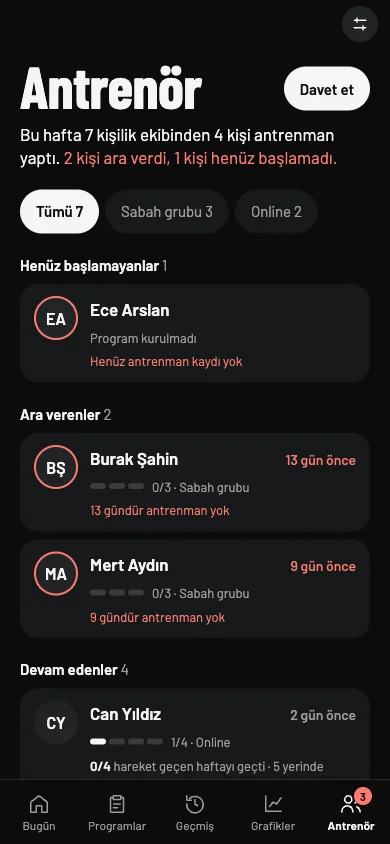
- Add athletes with an invite link and sort them into groups.
- Change a program and see whether it reached the athlete.
- Send comments and day notes; if one can’t be sent, what you wrote isn’t lost.
- Add videos to an athlete’s exercises and use templates.
Sample data
- Charts
- Body measurements and goal
- Exercise card: muscle map, video
- Exercise notes
- Sync across devices
Install
Add it to your home screen. It opens like an app.
Volume isn’t in an app store: it opens in your browser and installs on your phone from there.
iPhone
- Open the app in Safari.
- Tap the Share button at the bottom (the square with an arrow).
- Choose Add to Home Screen, then Add.
Android
- Open the app in Chrome on your phone.
- Tap the ⋮ menu at the top right.
- Choose Install app or Add to Home screen.
VolumeIt opens from your home screen with this icon, and your data stays in the same account.
Scan it with your phone
Point your camera at the code to open the app on your phone, then add it to your home screen.
dogulusal.github.io/Tracking-My-VolumeQuestions you might have
I don’t have a program. Where do I start?
The first time you open the app, it builds your program with you in five steps: how many days you can train, what to call them, exercises for each day, sets and reps, and which day is today. It suggests a split for your number of days, and you can rename them.
Will I lose my logs if I change phones?
No. You sign in with Google; your logs belong to your account and sync across devices. Edits stick, and deleted days stay deleted.
I keep my workouts in Google Sheets.
Connect it if you like: the app creates a Google Sheets file for you and copies your workouts into it after every save. It only asks for access to files it created. History in the app uses the same table layout.
Can my coach use it too?
Yes, there’s a coach mode. Coaches add athletes with an invite link, put them in groups, see who trained this week, change programs and check whether a change reached the athlete.
Is it in the app stores?
No. Volume runs in your browser; install it on your phone and it opens full screen from its own home-screen icon. The interface is in Turkish.
This week, your move.
Your first workout sets next week’s numbers to beat. Build your program and log your first sets; next week, the numbers will be waiting.